Wireless CNC Aluminum Keyboard with LCD & Hot-Swap
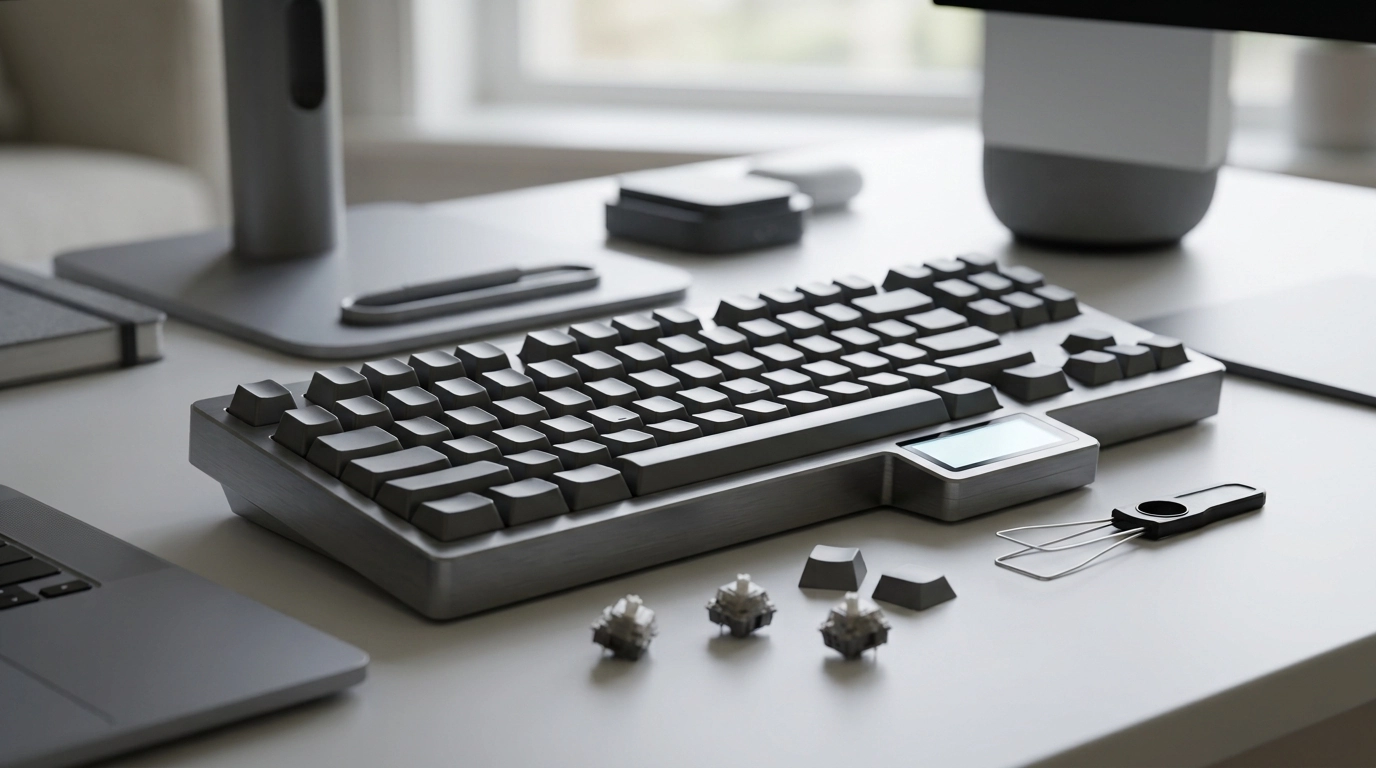
Wireless CNC Aluminum Mechanical Keyboard with LCD & Hot-Swap Switches
A wireless mechanical keyboard built with a CNC-machined aluminum case combines a premium feel with everyday practicality. With hot-swap switch support and an integrated LCD, it’s designed for users who want a solid, customizable board that can move between desk setups without fuss—while adding a quick at-a-glance display for status, profiles, or simple shortcuts.
If you’re ready to upgrade your setup, explore the Wireless CNC Aluminum Mechanical Keyboard with LCD & Hot-Swap Switches and check current price and availability.
What Sets This Keyboard Apart
- CNC aluminum chassis for a denser, more rigid build that helps reduce flex during typing.
- Wireless convenience for cleaner setups and quick switching between workspaces.
- Integrated LCD for fast visual feedback (mode, status, shortcuts, or custom screens depending on firmware/software support).
- Hot-swap sockets for easy switch changes without soldering—useful for tuning feel and sound over time.
- Built for users who want a premium case without giving up daily-driver features like wireless and customization.
Build Quality and Materials
Aluminum cases are popular because they add weight and stability, helping the keyboard stay planted during rapid typing, gaming, or shortcut-heavy workflows. A CNC-machined case typically comes with tighter tolerances and a cleaner fit between parts, which can reduce little annoyances like case creaks and uneven seams.
When you unbox and set up an aluminum board, a quick inspection pays off: look for level feet, consistent gaps along the case seam, and even keycap spacing across rows. Those details usually correlate with a more predictable typing feel and fewer surprises later if you decide to mod.
Sound-wise, aluminum can lean “clean” and a bit brighter depending on internal mounting and plate material. If you want a quieter, more refined profile, pairing your preferred switches with tuned stabilizers—and adding optional dampening if the design supports it—often makes a bigger difference than chasing tiny tweaks.
Wireless Use: What to Expect Day to Day
Wireless keyboards shine in multi-device setups, minimalist desks, and living-room workflows where a cable is simply in the way. Real-world performance depends on connection mode (often Bluetooth and/or a 2.4 GHz receiver), local interference, and how the keyboard handles power management.
- Keep the receiver or host device unobstructed when possible—metal monitor stands and desktop PCs under a desk can weaken signal.
- Try to avoid heavy 2.4 GHz congestion (busy routers, crowded offices) if you notice stutter; relocating the receiver a few inches can help.
- If wired mode is supported, use it for charging, firmware updates, and latency-sensitive sessions.
- Expect battery life to vary based on backlighting and LCD behavior; lower brightness and fewer animations usually extend runtime.
For a bit of standards context, the Bluetooth Core Specification details how Bluetooth devices manage connections and power behavior, which is why different devices can feel more or less responsive under the same conditions.
LCD Screen: Practical Uses
The integrated LCD is most useful when it acts like a tiny dashboard—confirming what the keyboard is doing without interrupting your flow. While exact features depend on the board’s software ecosystem, common use cases include:
- Quick status indicators: connection mode, battery level, active profile, or layer state.
- Productivity orientation: a profile name or macro “page” label so you always know what your keys will do.
- Customization: simple images, basic animations, or small widgets when supported by firmware/drivers.
A practical approach is to start with functional info (battery/mode/profile) and only add decorative screens once you’re confident the essentials are readable at a glance. If the keyboard supports VIA-style customization, the VIA Keyboard Configurator is a helpful reference point for what a lightweight remapping workflow can look like.
Hot-Swap Switches: Custom Feel Without Solder
Hot-swap sockets let you replace switches in minutes, which makes experimentation far less intimidating. That means you can start with one switch type and later move to something smoother, quieter, heavier, or more tactile without committing to a soldering setup.
Setup Checklist and Compatibility
When connecting or charging in wired mode, it can help to understand what “good cables” actually mean—USB fundamentals are covered in the USB Implementers Forum documentation.
Feature Snapshot
| Feature | What it does | Why it matters |
|---|---|---|
| CNC aluminum case | Rigid, weighty chassis | More stable feel; often cleaner acoustics and less flex |
| Wireless connectivity | Cable-free operation | Cleaner desk setup; easier multi-device use |
| LCD display | Shows status or custom screens | Fast confirmation of modes, battery, profiles, or shortcuts |
| Hot-swap sockets | Switch changes without soldering | Easy customization of typing feel and sound over time |
| Mechanical switches | Distinct actuation and feedback | More consistent typing experience and broad switch ecosystem |
Who This Keyboard Fits Best
Recommended Add-Ons and Other In-Stock Picks
- Wireless CNC Aluminum Mechanical Keyboard with LCD & Hot-Swap Switches
- Adidas Men’s White Sneakers
- Birkenstock Women’s White Leather Slippers
FAQ
What does hot-swap mean on a mechanical keyboard?
Hot-swap means you can remove and replace the keyboard’s switches without soldering. Most boards use MX-style switches, so it’s important to confirm 3-pin/5-pin compatibility and use a switch puller to avoid damaging the socket.
What can the LCD screen display?
Common LCD displays include battery level, connection mode, active profile, and layer status, plus simple custom images on supported systems. Exact options depend on the keyboard’s firmware and any companion software.
Is wireless good for gaming and fast typing?
Wireless can be excellent for both, but performance depends on the connection mode and your environment. Keeping the receiver close, reducing interference, and using wired mode for critical sessions can help ensure consistent responsiveness.













Leave a comment